Shooting Video
Bank options define the NovaX’s control sensitivity. Each setting reflects parameters such as the maximum bank angle and climb rate. Two of the bank settings are predefined.
The aerial photography (AP) bank setting provides a docile response that is ideal for new pilots and for capturing smooth video. The Sport setting opens up this quad’s performance potential. A third bank setting can be configured to your liking.
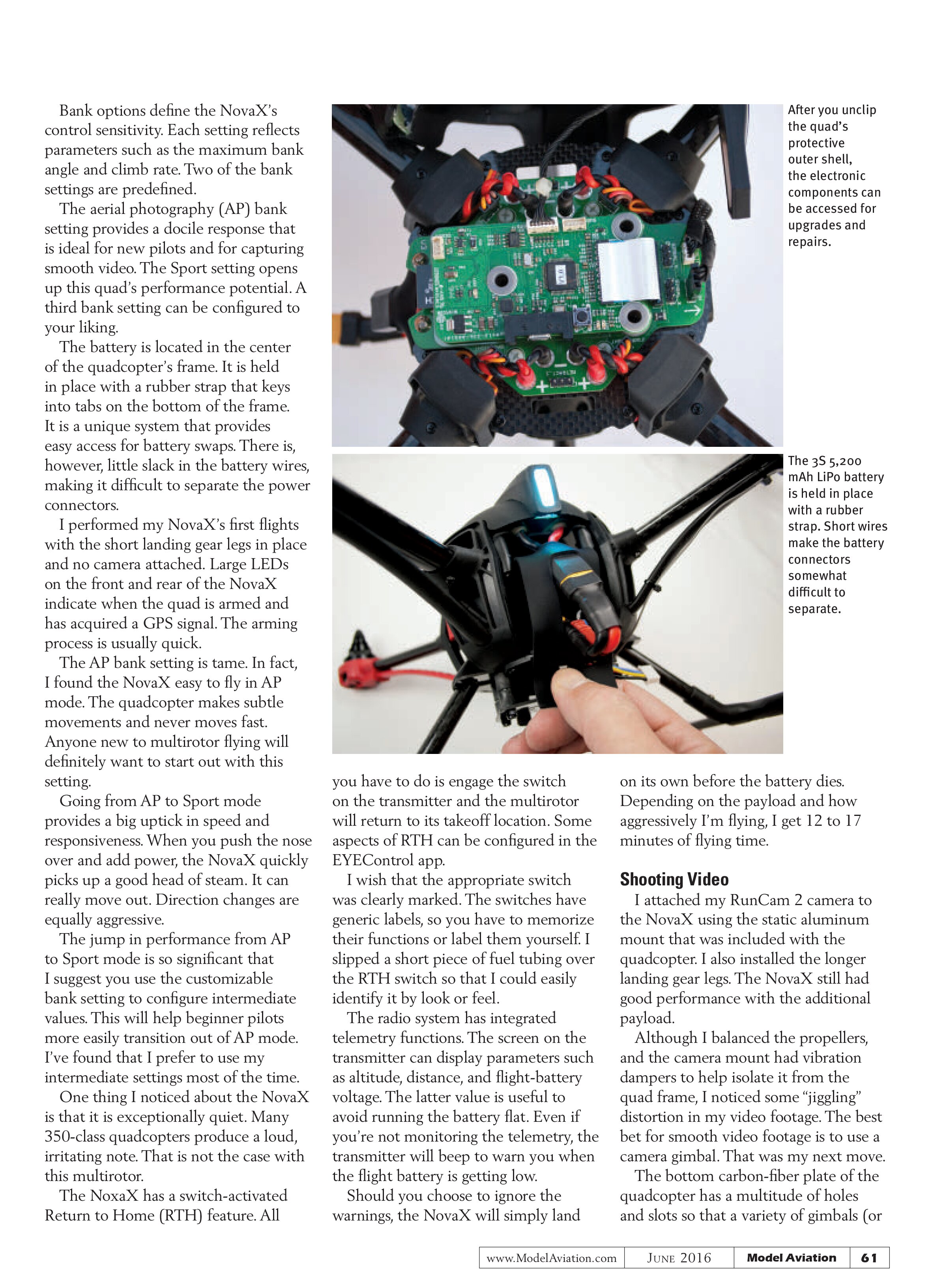
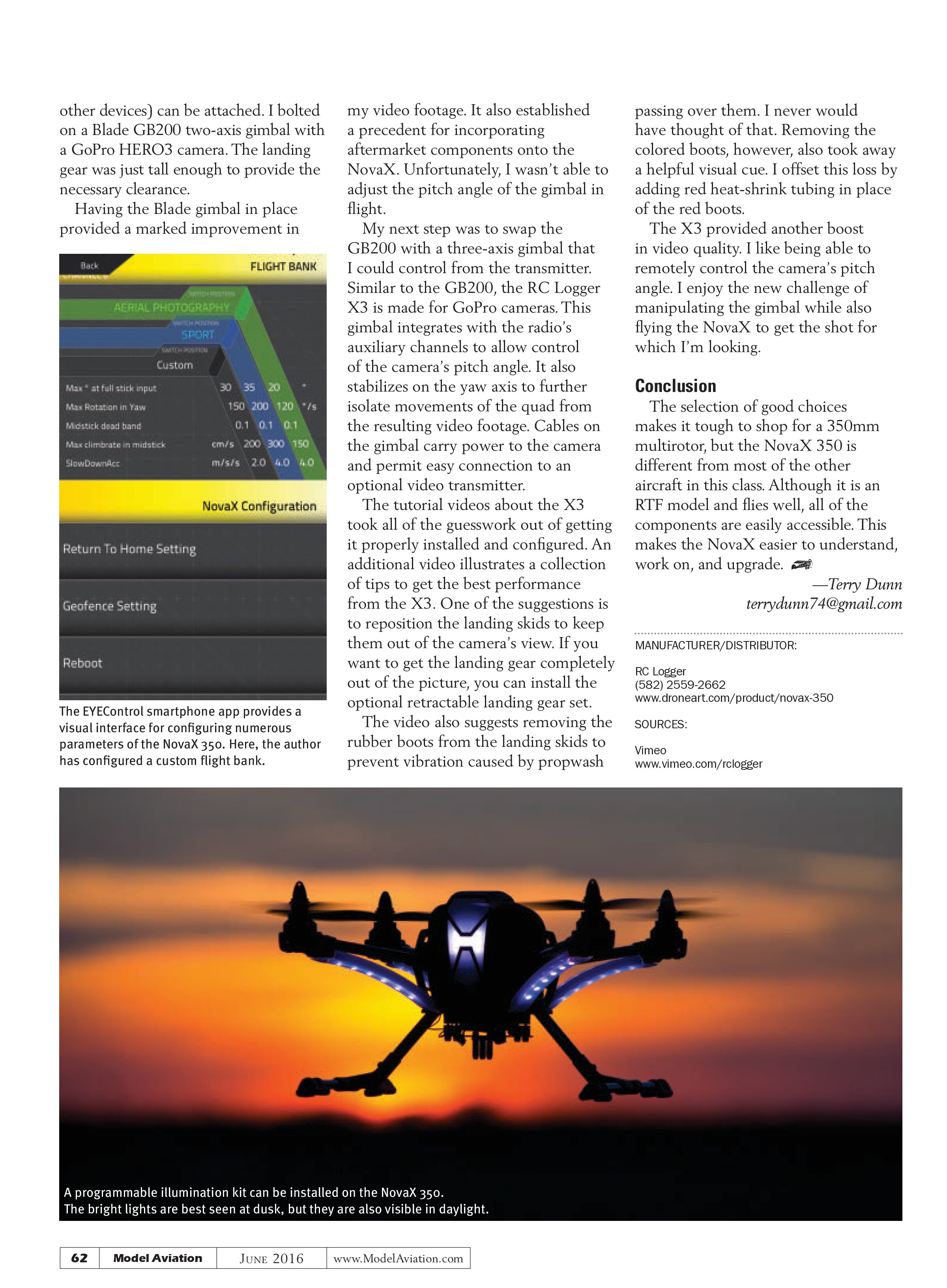
The battery is located in the center of the quadcopter’s frame. It is held in place with a rubber strap that keys into tabs on the bottom of the frame. It is a unique system that provides easy access for battery swaps. There is, however, little slack in the battery wires, making it difficult to separate the power connectors.
I performed my NovaX’s first flights with the short landing gear legs in place and no camera attached. Large LEDs on the front and rear of the NovaX indicate when the quad is armed and has acquired a GPS signal. The arming process is usually quick.
The AP bank setting is tame. In fact, I found the NovaX easy to fly in AP mode. The quadcopter makes subtle movements and never moves fast. Anyone new to multirotor flying will definitely want to start out with this setting.
Going from AP to Sport mode provides a big uptick in speed and responsiveness. When you push the nose over and add power, the NovaX quickly picks up a good head of steam. It can really move out. Direction changes are equally aggressive.
The jump in performance from AP to Sport mode is so significant that I suggest you use the customizable bank setting to configure intermediate values. This will help beginner pilots more easily transition out of AP mode. I’ve found that I prefer to use my intermediate settings most of the time.
One thing I noticed about the NovaX is that it is exceptionally quiet. Many 350-class quadcopters produce a loud, irritating note. That is not the case with this multirotor.
The NovaX has a switch-activated Return to Home (RTH) feature. All you have to do is engage the switch on the transmitter and the multirotor will return to its takeoff location. Some aspects of RTH can be configured in the EYEControl app.
I wish that the appropriate switch was clearly marked. The switches have generic labels, so you have to memorize their functions or label them yourself. I slipped a short piece of fuel tubing over the RTH switch so that I could easily identify it by look or feel.
The radio system has integrated telemetry functions. The screen on the transmitter can display parameters such as altitude, distance, and flight-battery voltage. The latter value is useful to avoid running the battery flat. Even if you’re not monitoring the telemetry, the transmitter will beep to warn you when the flight battery is getting low.
Should you choose to ignore the warnings, the NovaX will simply land on its own before the battery dies. Depending on the payload and how aggressively I’m flying, I get 12 to 17 minutes of flying time.


I attached my RunCam 2 camera
I attached my RunCam 2 camera to the NovaX using the static aluminum mount that was included with the quadcopter. I also installed the longer landing gear legs. The NovaX still had good performance with the additional payload.
Although I balanced the propellers, and the camera mount had vibration dampers to help isolate it from the quad frame, I noticed some “jiggling” distortion in my video footage. The best bet for smooth video footage is to use a camera gimbal. That was my next move.
The bottom carbon-fiber plate of the quadcopter has a multitude of holes and slots so that a variety of gimbals (or
other devices) can be attached. I bolted on a Blade GB200 two-axis gimbal with a GoPro HERO3 camera. The landing gear was just tall enough to provide the necessary clearance.
Having the Blade gimbal in place provided a marked improvement in

my video footage. It also established a precedent for incorporating aftermarket components onto the NovaX. Unfortunately, I wasn’t able to adjust the pitch angle of the gimbal in flight.
My next step was to swap the GB200 with a three-axis gimbal that I could control from the transmitter. Similar to the GB200, the RC Logger X3 is made for GoPro cameras. This gimbal integrates with the radio’s auxiliary channels to allow control of the camera’s pitch angle. It also stabilizes on the yaw axis to further isolate movements of the quad from the resulting video footage. Cables on the gimbal carry power to the camera and permit easy connection to an optional video transmitter.
The tutorial videos about the X3 took all of the guesswork out of getting it properly installed and configured. An additional video illustrates a collection of tips to get the best performance from the X3. One of the suggestions is to reposition the landing skids to keep them out of the camera’s view. If you want to get the landing gear completely out of the picture, you can install the optional retractable landing gear set.
The video also suggests removing the rubber boots from the landing skids to prevent vibration caused by propwash passing over them. I never would have thought of that. Removing the colored boots, however, also took away a helpful visual cue. I offset this loss by adding red heat-shrink tubing in place of the red boots.
The X3 provided another boost in video quality. I like being able to remotely control the camera’s pitch angle. I enjoy the new challenge of manipulating the gimbal while also flying the NovaX to get the shot for which I’m looking.
Conclusion
The selection of good choices makes it tough to shop for a 350mm multirotor, but the NovaX 350 is different from most of the other aircraft in this class. Although it is an RTF model and flies well, all of the components are easily accessible. This makes the NovaX easier to understand, work on, and upgrade.
—Terry Dunn
terrydunn74@gmail.com
MANUFACTURER/DISTRIBUTOR:
RC Logger
(582) 2559-2662
www.droneart.com/product/novax-350
SOURCES:
Vimeo
www.vimeo.com/rclogger